The best apps to put text behind a subject in a photo (2026)
We compared the apps that place text behind a person or object in a photo, from one-tap iPhone apps to Canva and Photoshop. What each is good at, honestly.
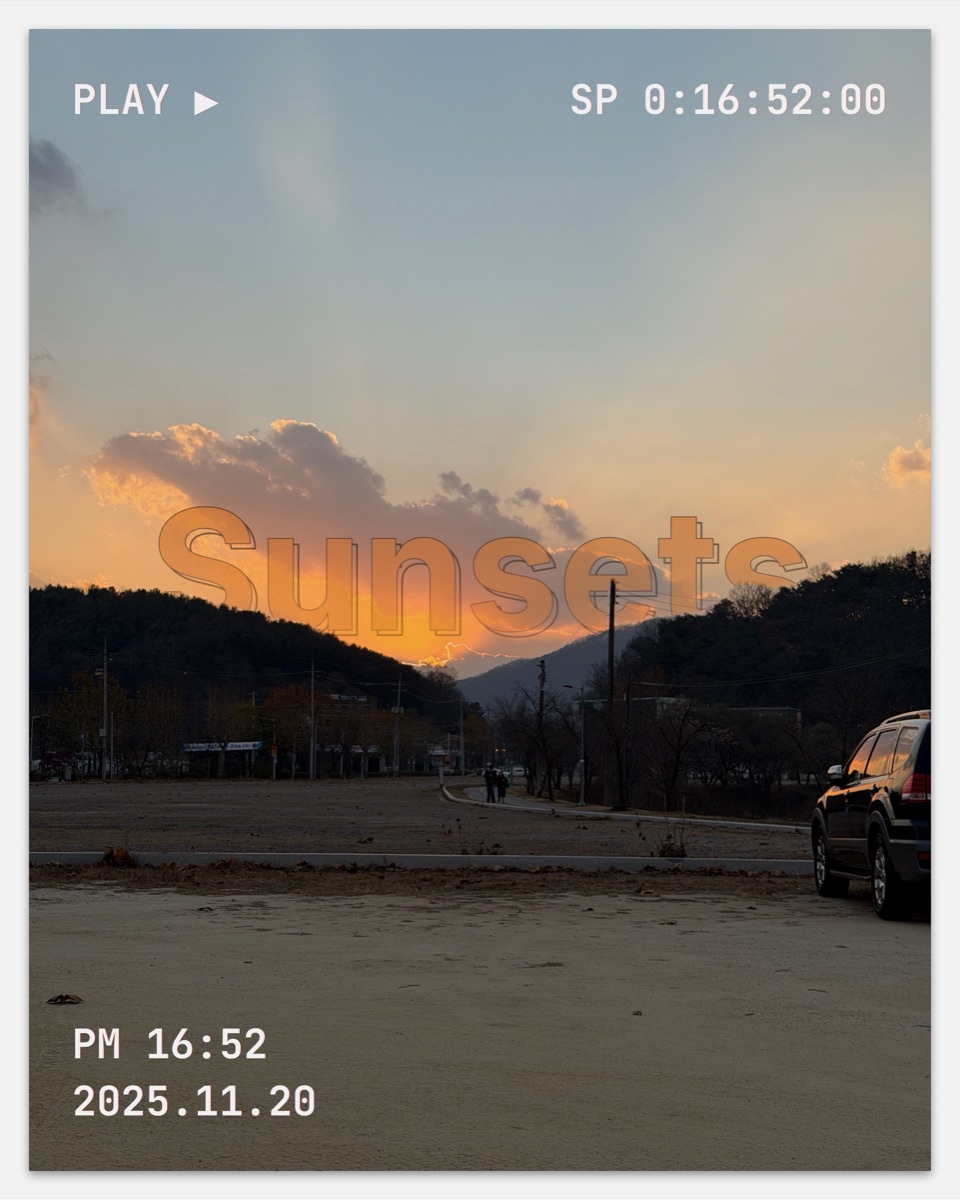
"Text behind subject" means placing a title so the main subject of a photo sits in front of it. Some apps do it automatically, some need you to cut the subject out yourself. Here is how the main options compare in 2026.
Full disclosure: we make layrd, the first app on this list. We've tried to be fair about where other tools are a better fit.
Quick comparison
| App | Platform | Automatic? | Best for |
|---|---|---|---|
 layrd layrd |
iPhone, iPad | Yes | Finished, editorial posts with frames, carousels and motion text |
 Canva Canva |
Web, iOS, Android | Partly (Pro) | People already designing in Canva |
 Behindly Behindly |
iPhone, iPad | Yes | A quick single-purpose effect |
 TextBehind Pro TextBehind Pro |
iPhone, iPad | Yes | Simple text-behind edits offline |
 DeepText DeepText |
iPhone, iPad | Yes | 3D-style text effects |
 Write Behind Write Behind |
iPhone, iPad | No (brush) | Painting the mask by hand |
 Photoshop Photoshop |
Desktop, iPad, iPhone | Partly | Full manual control, print work |
1. layrd
Best for: photographers and creators who want the whole post finished in one app.
layrd finds the people and objects in your photo and slips your text behind them in one tap. You can also place text at a chosen depth, which handles landscapes and city shots where there isn't one obvious subject. Detection runs on the device, so photos aren't uploaded.
What sets it apart is everything around the effect: 40+ editorial templates and frames, camera details (camera, lens, aperture, ISO) pulled from your photo, panorama splitting into seamless Instagram carousels, and animated text exported as MP4, GIF or APNG.
Worth knowing: iPhone and iPad only for now (Android is coming). Free to try; layrd Pro removes the watermark and unlocks full resolution.
2. Canva
Best for: people who already make their social posts in Canva.
Canva doesn't have a one-tap "text behind" button. The usual method is to duplicate your photo, remove the background from the top copy with BG Remover, then put a text layer between the two copies. The background remover is a Canva Pro feature.
Worth knowing: it's flexible and works on every platform, but it takes several steps, and moving the text later means re-arranging layers.
3. Behindly
Best for: a quick, single-purpose edit on iPhone.
Behindly is a dedicated iPhone app that detects the foreground and puts text behind it. It does one thing and is easy to pick up.
4. TextBehind Pro
Best for: simple text-behind edits that work offline.
Another dedicated iPhone app. It processes photos on the device without a cloud upload, and focuses on putting bold text behind people, pets and objects.
5. DeepText
Best for: 3D-style text effects.
DeepText places text behind objects and leans into stylised 3D text looks, which suits playful or bold posts more than editorial ones.
6. Write Behind Text On Photo
Best for: people who want to paint exactly what goes in front of the text.
Write Behind is one of the oldest apps for this effect, with more than 13,000 ratings on the App Store. It doesn't detect the subject for you. Instead, you brush over the parts of the photo that should sit in front of the text, which gives you precise edges if you take the time. It also has more than 85 fonts, text shadows and a black-and-white background option.
Worth knowing: masking by hand takes longer than a one-tap app, and the app hasn't been updated since 2018.
7. Adobe Photoshop
Best for: total control, print and client work.
Photoshop can select the subject automatically (Select Subject), and you then mask a copy of the photo above your text layer. Nothing beats it for control, but it's a subscription and it's slower for a quick social post. There is an iPhone app now, but masking layers on a phone screen takes more steps than a one-tap app.
How to choose
- Want the effect in one tap, plus a finished-looking post? layrd.
- Already live in Canva and have Pro? Use Canva's background remover method.
- Need a single quick edit? A one-purpose app like Behindly is fine.
- Want to paint the mask yourself on iPhone? Write Behind.
- Doing print or client retouching? Photoshop.
- Just want to try it once? Use our free text behind image tool in your browser.
Frequently asked questions
What is the text behind subject effect called?
It's usually called "text behind image", "text behind subject" or "depth text". The subject of the photo overlaps the text, so the title looks like it's part of the scene.
Is there a free app to put text behind a person?
Most of these apps are free to download with paid upgrades. For a completely free option, try our browser tool, or lift the subject with the iPhone Photos app and combine it in a layer editor. See how to put text behind a person on iPhone.
Can I do it on Android?
Canva works on Android today. layrd for Android is coming soon; you can join the waitlist.
Do these apps upload my photos?
It depends on the app. layrd and our browser tool detect the subject on your device and don't upload your photo. Check each app's privacy details on the App Store before you use it.